
/install html-mark
HTML Mark — click-to-annotate overlay
Demo
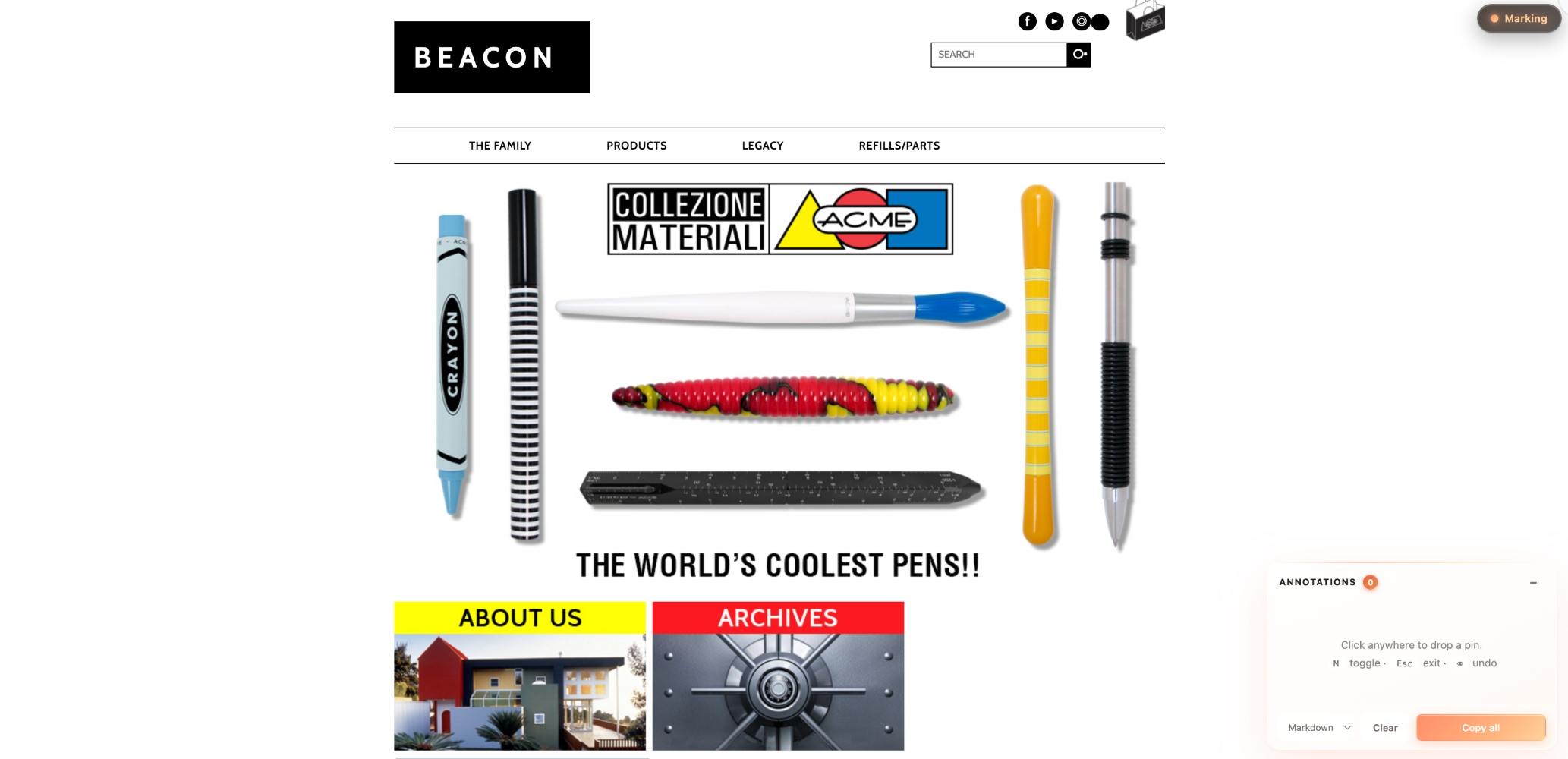
Activate — a dark glass pill in the top-right corner. Click it or press M, then click anywhere on the page to start dropping pins.
Annotate — every click drops a coral-gradient pin and opens an inline note popup. Press Enter to save, and the pin gains a small coral dot indicating "has note." Notes accumulate in the side panel; "Copy all" exports them as Markdown / Plain / JSON.
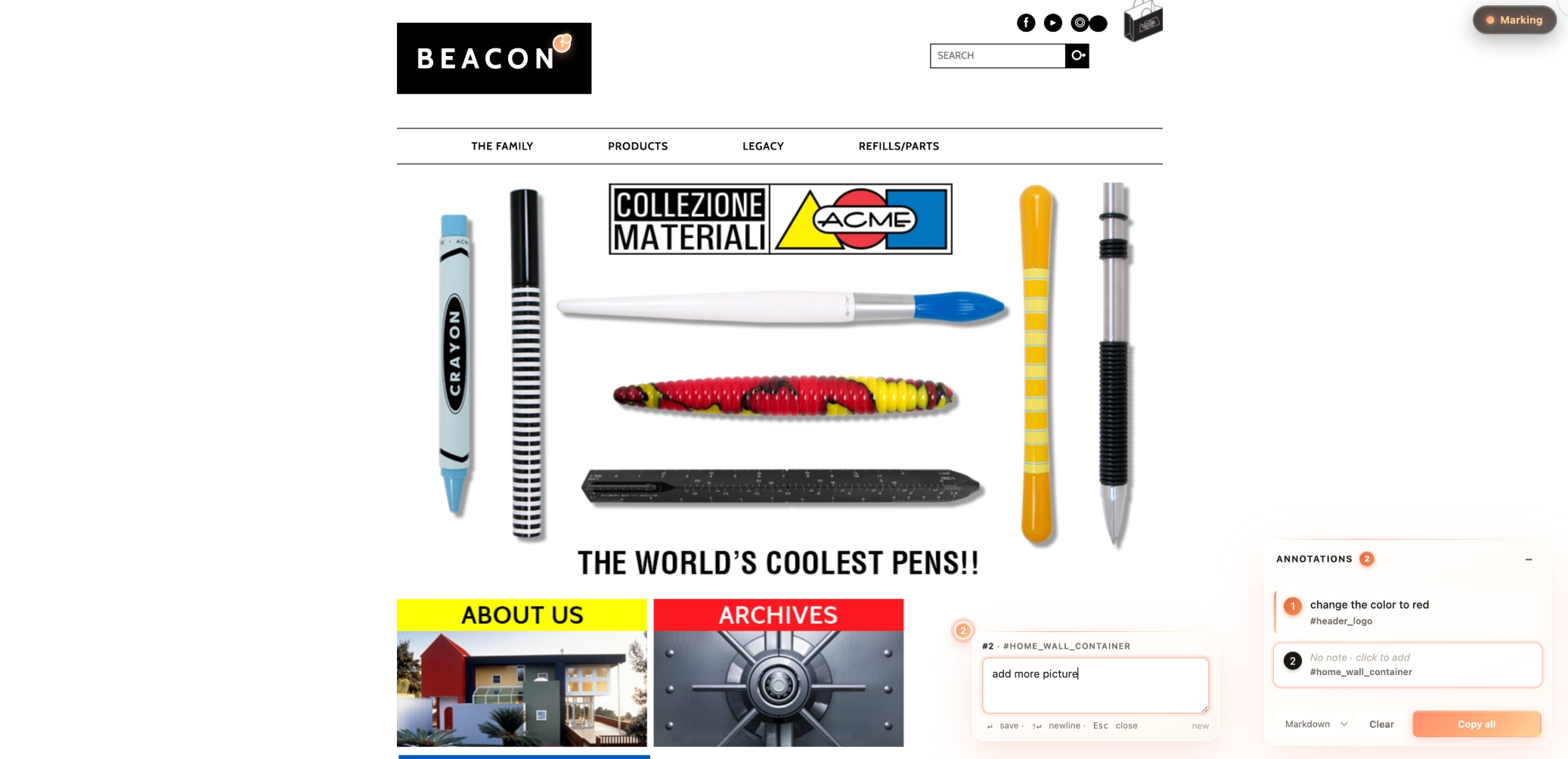
The copied output (Markdown) you'd paste into Notion / Linear / Lark:
**1.** change the color to red
   \x3Csub>#header_logo · `#header_logo`\x3C/sub>

**2.** add more picture
   \x3Csub>[data-mm-label] · `[data-mm-label]`\x3C/sub>
When to invoke
Trigger this skill when:
- The user wants to add review-style annotation capability to an HTML prototype (design mockup, Figma export, static page).
- The user is preparing to do design review: click → write feedback → copy → paste to PM / designer / engineer.
- The user wants a bookmarklet they can run on any web page to pin-annotate it.
Trigger keywords (both English and 中文 should fire):
- English: "add html-mark", "add mark mode", "add annotation pins", "click annotate", "let me mark up this HTML for review", "generate a mark-mode bookmarklet"
- 中文: "加 html-mark"、"加 mark mode"、"评审打点"、"标注模式"、"打点功能"、"给这个 HTML 加上标注"
What this skill provides
A single-file self-contained runtime (html-mark.js). After injection it gives the page:
- A dark glass toggle pill in the top-right (
● Mark/● Marking). OFF = gray dot; ON = glowing coral-gradient dot + honey text. - When ON, the cursor becomes a crosshair. Clicking any element drops a 22px coral-gradient orb (
#ff8d6b → #ffaf7a → #ffc890) with a scale-bounce entry animation. - An inline glass note popup pops open next to the pin — type "what should change here," press
Enterto save,Esc/ click outside to cancel-or-autosave. This is the core review connection point. - A glass Annotations panel floats bottom-right — draggable, collapsible to a single-row badge. Lists every pin's note + element label.
- Hover a panel item → corresponding pin scales up, target element gets a coral outline (visual cross-reference).
- Clicking a panel item or the pin itself re-opens the note popup for editing.
- "Copy all" supports three formats — note is the body, element description goes to a sub-line of meta:
**1.** This copy needs to be shorter — 8 chars max \x3Csub>Button · "Get Started Free" · `button.btn-primary`\x3C/sub> - Keyboard:
Mtoggle,Escexit / close popup,Backspacedelete last pin,Entersave note,Shift+Enternewline. - A pin with a saved note wears a coral light-dot on its top-right corner.
- Panel:
−collapses,Clearempties all,×(on hover) removes one item. - Panel list items with notes have a vertical coral gradient bar on the left as a visual anchor.
Visual style: dark glass toggle + translucent white glass panels + coral → peach → honey warm gradient accent. Glassmorphism aesthetic — prominent without competing with the target page (especially well-suited to brand sites, premium designs, light / warm-tone palettes).
Usage scenarios
Scenario A — single HTML prototype file (most common)
Default action: inline the runtime as a \x3Cscript> block before the target HTML's \x3C/body> (keeps the HTML self-contained so the user can email or AirDrop it).
cat ~/.claude/skills/html-mark/html-mark.js
Then use Edit to wrap the runtime in \x3Cscript>…\x3C/script> and insert before \x3C/body>. Do not trim anything — the script is fully self-contained (CSS is inlined, DOM is self-injected, all class names use the .mm-* prefix for isolation).
Scenario B — multi-page project with a JS asset pipeline
Copy html-mark.js to project root or assets folder, then in each HTML:
\x3Cscript src="./html-mark.js">\x3C/script>
It auto-initializes on load.
Scenario C — any URL, no source access (bookmarklet)
If the user says "I want to mark up a live web page / a competitor site," generate a base64 self-contained bookmarklet:
echo "javascript:$(python3 -c "
import urllib.parse
js = open('$HOME/.claude/skills/html-mark/html-mark.js').read()
print(urllib.parse.quote(js, safe=''))
")"
Alternatively, host on GitHub Pages / gist / Vercel and use the short-reference variant:
javascript:(function(){if(window.__markModeLoaded)return;var s=document.createElement('script');s.src='https://YOUR_HOST/html-mark.js';document.head.appendChild(s);})();
Optional: custom pin labels
If the target HTML has semantically opaque elements (a \x3Cdiv> representing a card without an id or meaningful class), add data-mm-label="My Section" and the pin will use that verbatim. The runtime already supports this — no need to change the script.
What NOT to do
- ❌ Don't rewrite the script — it's been tuned in
html-mark.js, use as-is. - ❌ Don't split the CSS out — the script injects its own
\x3Cstyle>tag, everything is self-contained. - ❌ Don't hardcode the toggle button into the target HTML's nav — the script floats it via
position: fixed. - ❌ Don't try to convert the panel to a "side drawer" or move its location (unless the user explicitly asks) — bottom-right floating is the validated default.
Verification
After injection, ask the user to open the HTML and confirm:
- Dark glass capsule
● Markappears top-right (gray dot). - Click the pill or press
M→ becomes● Marking(glowing coral dot, honey text), cursor → crosshair, glass annotation panel appears bottom-right. - Click anywhere on the page → coral-gradient pin drops with a bounce animation, glass note popup opens beside it (textarea + hint
↵ save · ⇧↵ newline · Esc close). - Type a note → press
Enter→ popup closes, pin gains a coral dot on its corner (has-note indicator). - Hover a panel item → corresponding pin scales up, target element gets a coral outline.
- Click
Copy all(default Markdown) → dark glass toast✓ N annotations copied as MD, clipboard contains formatted Markdown. - Press
Esc→ mark mode off; pressBackspacewhile ON → deletes the most recent pin. - Drag the panel header → panel moves; click
−→ collapses to a single-row badge.
Version history
- 2026-05-17: First iteration on the Deeplumen Shopify App prototype. Transformed reviewer feedback from "screenshots + verbose text" to "click → one-key copy." Major communication efficiency win — the skill is consolidated from that workflow.
- 2026-05-18 (major refactor): The core UX gap was "pins recorded DOM descriptions but had nowhere to write review feedback." Fixed by adding the inline note popup that opens immediately after dropping a pin — making "what I think about this" a first-class citizen. Plus keyboard shortcuts (M/Esc/Backspace/Enter), draggable & collapsible panel, hover-to-highlight target element, and Markdown/Plain/JSON export.
- 2026-05-18 (visual redesign): Switched from "editorial restraint" (cream + bronze + charcoal) to glassmorphism + coral gradient. Toggle inverted to dark glass for stronger presence, pins became coral→peach→honey gradient orbs, note popup and panel adopted real backdrop-filter blur. Added pin-bounce and popup-scale micro-animations.
- 2026-05-19 (v1.0.0): Increased contrast on toggle and serial badges (deeper coral, more saturation). First public release on ClawHub under slug
mark-mode. - 2026-05-19 (slug rename): Renamed slug
mark-mode→html-markfor clearer scope. GitHub repoxuxinmaxen/html-markcreated. CSS class prefix.mm-*kept unchanged (implementation detail, decoupled from public slug). - 2026-05-19 (v1.1.0): Added demo screenshots, translated all docs to English. No runtime changes.
- 2026-05-19 (v1.1.1): Moved screenshot embeds into SKILL.md (the page ClawHub renders) using absolute GitHub raw URLs so images are visible on both GitHub and ClawHub. Swap screenshot filenames so they match their content.
Consistency notes
- All UI elements use
.mm-*class prefixes — guaranteed not to collide with the target HTML's CSS. - Internal flag
window.__markModeLoadedis preserved (legacy name from initial release) so re-injection is idempotent.
- 确保已安装 OpenClaw(本地或 Docker 部署)
- 在对话框中输入安装命令:
/install html-mark - 安装完成后,直接呼叫该 Skill 的名称或使用
/html-mark触发 - 根据 Skill 的参数说明提供必要输入,即可获得结构化输出
HTML Mark 是什么?
Drop coral-gradient pins on any HTML page, write feedback in an inline glass note popup, copy out as Markdown / Plain / JSON for design review. Glass-morphis... 它是一个面向 Claude Code / OpenClaw 的 AI Agent Skill 插件,目前累计下载 99 次。
如何安装 HTML Mark?
在 OpenClaw 或 Claude Code 对话框中运行命令「/install html-mark」即可一键安装,无需额外配置。
HTML Mark 是免费的吗?
是的,HTML Mark 完全免费,采用 MIT-0 许可证,可自由下载、安装和使用。
HTML Mark 支持哪些平台?
HTML Mark 跨平台运行,可在任意部署了 OpenClaw / Claude Code 的环境中使用(cross-platform)。
谁开发了 HTML Mark?
由 Maxen(@xuxinmaxen)开发并维护,当前版本 v1.1.1。