← 返回 Skills 市场
jerryaction

Daily English Card

作者 JerryAction · GitHub ↗ · v1.0.5 · MIT-0
cross-platform ⚠ suspicious
74
总下载
0
收藏
0
当前安装
6
版本数
在 OpenClaw 中安装
/install daily-english-card
功能描述
每日英语口语学习卡片推送。每天早上8:30自动生成英语场景对话卡片图片并推送到微信。 支持440个日常场景、11种卡片风格、遗忘曲线复习,自动上传到IMA知识库存档。 触发词:英语卡片、英语学习、英语口语、口语练习、每日英语、英语推送、English card、口语、学英语、背单词
使用说明 (SKILL.md)

每日英语场景对话卡片推送

核心原则

  • 必须用 python3.9:Homebrew [email protected] 无 Pillow,路径固定为 /usr/local/opt/[email protected]/bin/python3.9
  • 只发送图片,不附加文字:message 工具发图时 media 字段只填图片路径
  • 不回复 HEARTBEAT_OK:定时推送时直接输出确认,不要回复心跳确认
  • IMA 失败不阻塞:上传失败时卡片仍推送,标记错误但不中断

Prerequisites

  1. Python 环境:/usr/local/opt/[email protected]/bin/python3.9 -m pip install Pillow
  2. 数据文件:~/workspace/english_learning.json(440场景)
  3. IMA 凭证:~/Library/Application Support/QClaw/openclaw/config/skills/ima/get-token.sh
  4. cron job 已配置(见附录)

推送流程

Step 1:生成卡片

/usr/local/opt/[email protected]/bin/python3.9 ~/workspace/scripts/push_english_daily.py

脚本输出 JSON 到 stdout,提取 image_path 字段。

正常输出示例:

{
  "image_path": "~/workspace/cards/card_2026-04-27.png",
  "style": "lake",
  "title_zh": "餐厅点餐",
  "progress": "12/440",
  "is_weekend": false,
  "tencent_doc_url": ""
}

失败处理:

  • python3.9: command not found → 改用 python3 重试,并报告路径错误
  • PIL 报错 → 确认用的是 python3.9,不是系统 python3
  • 脚本报错 → 直接报告错误,不继续

Step 2:发送图片到微信

从 Step 1 输出中提取 image_path,使用 message 工具:

  • channel: openclaw-weixin
  • target: [email protected]
  • accountId: e7aef5bc05d2-im-bot
  • media: 图片绝对路径(展开 ~ 为真实路径)

⚠️ 不要附加文字消息,只发图片。如果发了文字,微信会将图片压缩。

失败处理:

  • 发送失败 → 报告"图片发送失败,请手动检查"
  • 路径不存在 → 用 ls ~/workspace/cards/ 确认文件是否存在

Step 3:输出确认

图片发送成功后,输出简短确认:

✅ 今日英语卡片已送达
📖 场景:餐厅点餐(进度 12/440)
🎨 风格:清冷湖海

卡片系统说明

学习逻辑

时间 行为
工作日 学习新场景,current_index + 1
周末 按遗忘曲线找复习场景,不推进进度
遗忘曲线间隔 [1, 2, 4, 7, 15]

11 种风格

风景风格(4种):forest 雾境森林 | sunrise 山野晨昏 | lake 清冷湖海 | twilight 荒原暮色

色卡风格(7种):periwinkle 梦幻薰衣 | blush 蜜桃绒纱 | candy 糖果彩虹 | nautical 海军蓝调 | lavender 薰衣草梦 | ocean 深海幽蓝 | warmth 暖阳绒毯

风格按日期轮换(11天一轮),同一天风格固定。

数据文件

  • 场景数据:~/workspace/english_learning.json(440场景,44主题×10变体)
  • 卡片输出:~/workspace/cards/card_YYYY-MM-DD.png
  • 进度管理:~/workspace/scripts/learning_manager.py

Fallback

问题 解决方案
python3.9 找不到 改用 python3,并报告需修复路径
PIL 报错 确认用的是 Homebrew [email protected],不是系统 Python
脚本输出非 JSON 直接报告脚本错误,不继续
图片路径含 ~ 无法发送 os.path.expanduser() 展开为绝对路径
IMA 上传失败 卡片仍推送,报告"IMA 存档失败(可忽略)"
微信发送失败 报告"发送失败,请手动检查",不阻塞
同名文件已存在 push_english_daily.py 会覆盖,无需处理

Troubleshooting

问题 原因 解决
推送了错误的卡片风格 cron payload 中 python 路径写错用了系统 python3 确认 cron payload 中用的是 python3.9
进度不前进 脚本出错但 agent 没有检查 看脚本输出 JSON 是否有 image_path
IMA 存档空白 COS 上传权限问题 检查 get-token.sh 是否有效
图片在微信中显示异常 中文图片触发 OCR 违规(腾讯文档已弃用,改用 IMA) 确认用的是 IMA 而非腾讯文档

手动测试

# 1. 生成卡片(检查输出)
/usr/local/opt/[email protected]/bin/python3.9 ~/workspace/scripts/push_english_daily.py

# 2. 确认图片存在
ls ~/workspace/cards/card_$(date +%Y-%m-%d).png

# 3. 手动发送
openclaw cron run \x3CYOUR_CRON_JOB_ID>

Cron 配置(参考)

{
  "schedule": { "kind": "cron", "expr": "30 8 * * *", "tz": "Asia/Shanghai" },
  "sessionTarget": "isolated",
  "delivery": {
    "mode": "announce",
    "channel": "openclaw-weixin",
    "to": "[email protected]",
    "accountId": "e7aef5bc05d2-im-bot"
  },
  "wakeMode": "now"
}

文件结构

~/.qclaw/skills/daily-english-card/
├── SKILL.md      # 本文件
└── README.md     # 详细文档(含脚本逻辑、重建指南)

~/workspace/scripts/
├── push_english_daily.py       # 主推送脚本(生成卡片 + IMA上传)
├── generate_english_card.py     # 卡片图片生成器
└── learning_manager.py          # 遗忘曲线进度管理

~/workspace/
├── english_learning.json        # 440场景数据

卡片效果图
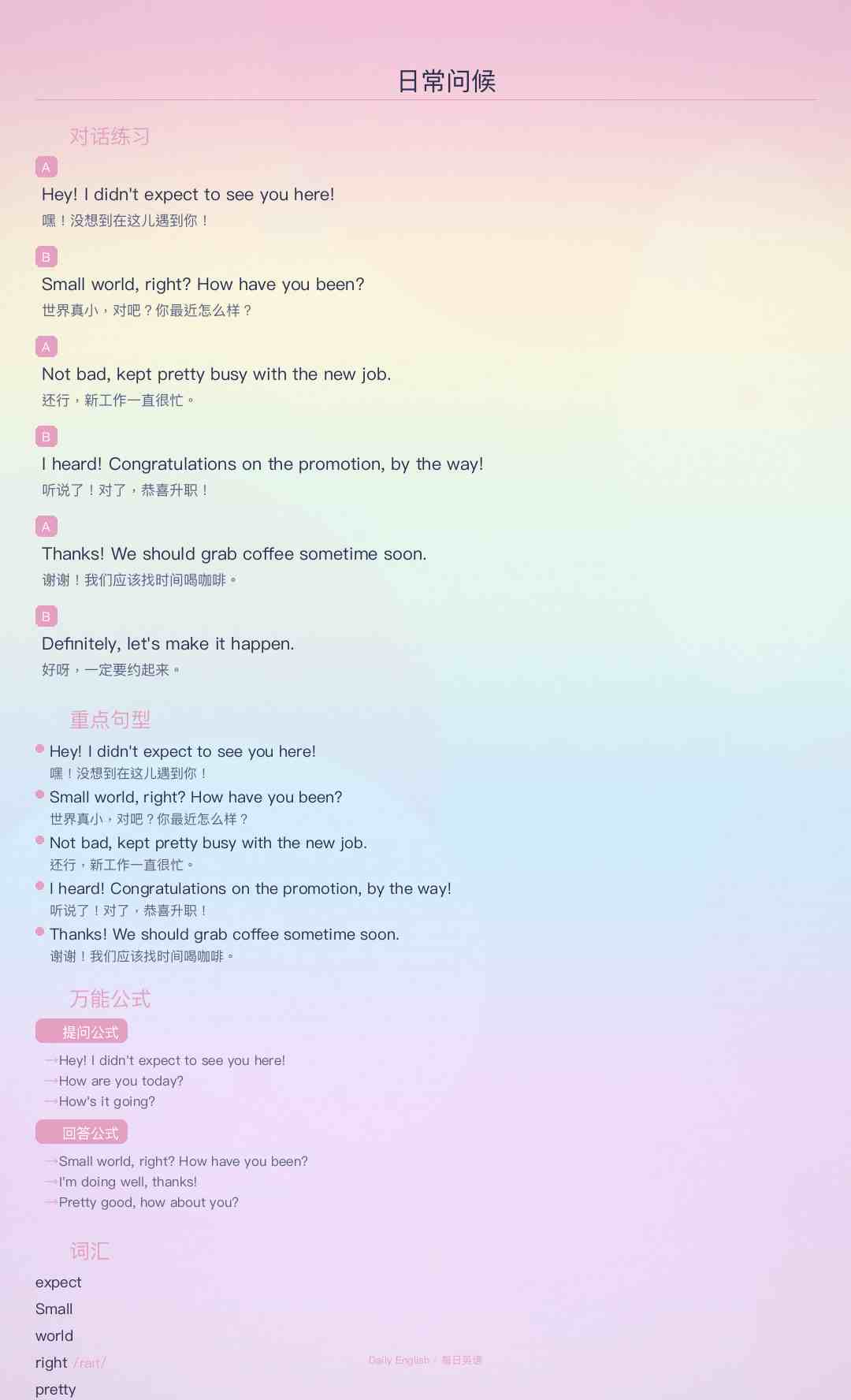
英语卡片效果图

安全使用建议
This skill appears to do what it claims (generate and push daily English-card images), but its manifest does not declare several dependencies and sensitive local resources that the instructions require. Before installing or enabling it: 1) Inspect the actual local scripts referenced (~/workspace/scripts/push_english_daily.py, generate_english_card.py, learning_manager.py) to confirm they are safe and do not exfiltrate data. 2) Verify the contents of any token scripts (e.g., ~/.qclaw/scripts/get-token.sh or ~/Library/Application Support/QClaw/.../get-token.sh) — these grant access to the Gateway/IMA and should be treated as credentials. 3) Confirm you expect messages to be sent to the hardcoded WeChat target and accountId; change them if necessary. 4) Ensure the workspace data file (~/workspace/english_learning.json) and generated cards are stored where you want them and contain no private data. 5) Because the skill assumes a specific Python binary path, either provide that environment or update the cron payload to call the correct interpreter. 6) If you have limited trust in the skill source, do not enable autonomous/cron runs until you review the scripts and token handling; run it manually in an isolated environment first. If you want, I can list specific things to search for inside the scripts (network calls, subprocess.exec/curl usage, file uploads, token handling) to help with the code review.
功能分析
Type: OpenClaw Skill Name: daily-english-card Version: 1.0.5 The skill is a legitimate automation tool designed to generate and push daily English learning cards to WeChat. It uses local Python scripts (push_english_daily.py, generate_english_card.py) to create images based on a 440-scenario dataset and manages learning progress via a forgetting curve logic. While it involves shell execution and uses hardcoded WeChat identifiers, these actions are transparently documented and strictly aligned with the stated purpose of automated delivery and archival to the Tencent IMA knowledge base. No evidence of malicious intent or data exfiltration was found in the instructions or documentation.
能力评估
Purpose & Capability
The stated purpose (generate daily English dialog card images, upload to IMA, push to WeChat) aligns with the runtime steps in SKILL.md: run local Python scripts, produce a PNG, upload to IMA, and call the message tool to push to a fixed WeChat target. However, the skill metadata declared no required env vars or config paths while the instructions rely on several local credentials/scripts and a fixed target account, which is an inconsistency to be aware of.
Instruction Scope
SKILL.md instructs the agent to read and run local scripts and data files (~/workspace/scripts/push_english_daily.py, learning_manager.py, ~/workspace/english_learning.json), to call a local Gateway API using a token script (e.g. ~/.qclaw/scripts/get-token.sh or ~/Library/Application Support/QClaw/.../get-token.sh), and to use a message tool to deliver to a hardcoded WeChat target/accountId. Those actions are within the feature's domain, but they access undeclared local paths and credentials and hardcode a recipient — the instructions thus require access to sensitive local tokens and files not advertised by the skill manifest.
Install Mechanism
This is instruction-only (no install spec, no code files bundled). That minimizes installer risk because nothing is downloaded or written by the skill itself. The README references Node/Python scripts to run locally, but the skill does not cause downloads.
Credentials
The declared manifest lists no required environment variables or config paths, but runtime instructions expect access to IMA credentials (via get-token.sh paths), local openclaw/get-token scripts, the user's ~/workspace files, and messaging/Gateway tokens. Requiring local auth scripts and a gateway token is proportionate to uploading to IMA and calling a local messaging API — but they should have been declared. The hardcoded WeChat target and accountId increase risk if you don't expect messages to be sent to that identity.
Persistence & Privilege
The skill does not request always:true and doesn't request elevated or cross-skill config changes. Autonomous invocation is allowed by default (disable-model-invocation false), which is normal for skills. No evidence it modifies other skills or system-wide settings.
如何使用
  1. 确保已安装 OpenClaw(本地或 Docker 部署)
  2. 在对话框中输入安装命令:/install daily-english-card
  3. 安装完成后,直接呼叫该 Skill 的名称或使用 /daily-english-card 触发
  4. 根据 Skill 的参数说明提供必要输入,即可获得结构化输出
版本历史
v1.0.5
删除 README 效果图,SKILL.md 末尾保留效果图展示
v1.0.4
更新图床链接
v1.0.3
使用外部链接显示卡片效果图
v1.0.2
在 SKILL.md 中添加卡片效果图
v1.0.1
添加卡片效果图到 README,更新微信推送配置为 openclaw-weixin 通道
v1.0.0
Initial release: daily English scene conversation card with WeChat push and IMA archive
元数据
Slug daily-english-card
版本 1.0.5
许可证 MIT-0
累计安装 0
当前安装数 0
历史版本数 6
常见问题

Daily English Card 是什么?

每日英语口语学习卡片推送。每天早上8:30自动生成英语场景对话卡片图片并推送到微信。 支持440个日常场景、11种卡片风格、遗忘曲线复习,自动上传到IMA知识库存档。 触发词:英语卡片、英语学习、英语口语、口语练习、每日英语、英语推送、English card、口语、学英语、背单词. 它是一个面向 Claude Code / OpenClaw 的 AI Agent Skill 插件,目前累计下载 74 次。

如何安装 Daily English Card?

在 OpenClaw 或 Claude Code 对话框中运行命令「/install daily-english-card」即可一键安装,无需额外配置。

Daily English Card 是免费的吗?

是的,Daily English Card 完全免费,采用 MIT-0 许可证,可自由下载、安装和使用。

Daily English Card 支持哪些平台?

Daily English Card 跨平台运行,可在任意部署了 OpenClaw / Claude Code 的环境中使用(cross-platform)。

谁开发了 Daily English Card?

由 JerryAction(@jerryaction)开发并维护,当前版本 v1.0.5。

💬 留言讨论