← 返回 Skills 市场
jianglingling007

Claw Body

作者 jianglingling007 · GitHub ↗ · v1.0.10 · MIT-0
cross-platform ⚠ suspicious
221
总下载
0
收藏
0
当前安装
11
版本数
在 OpenClaw 中安装
/install claw-body
功能描述
Give your Claw a body! Turn your AI Claw into a real-time digital avatar with face, voice, and expressions. Talk face-to-face with your Claw — not just text....
使用说明 (SKILL.md)

🦞 Claw Body — Give Your Claw a Body

Claw Body Preview

Every Claw deserves a body.

Turn your OpenClaw AI into a real-time digital avatar — with a face, a voice, and expressions. Talk to your Claw face-to-face, not just through cold text.

NEW: Presentation Mode 🎤 — Your Claw can now be a presenter! Load a PPT/PDF and let the avatar narrate your slides.
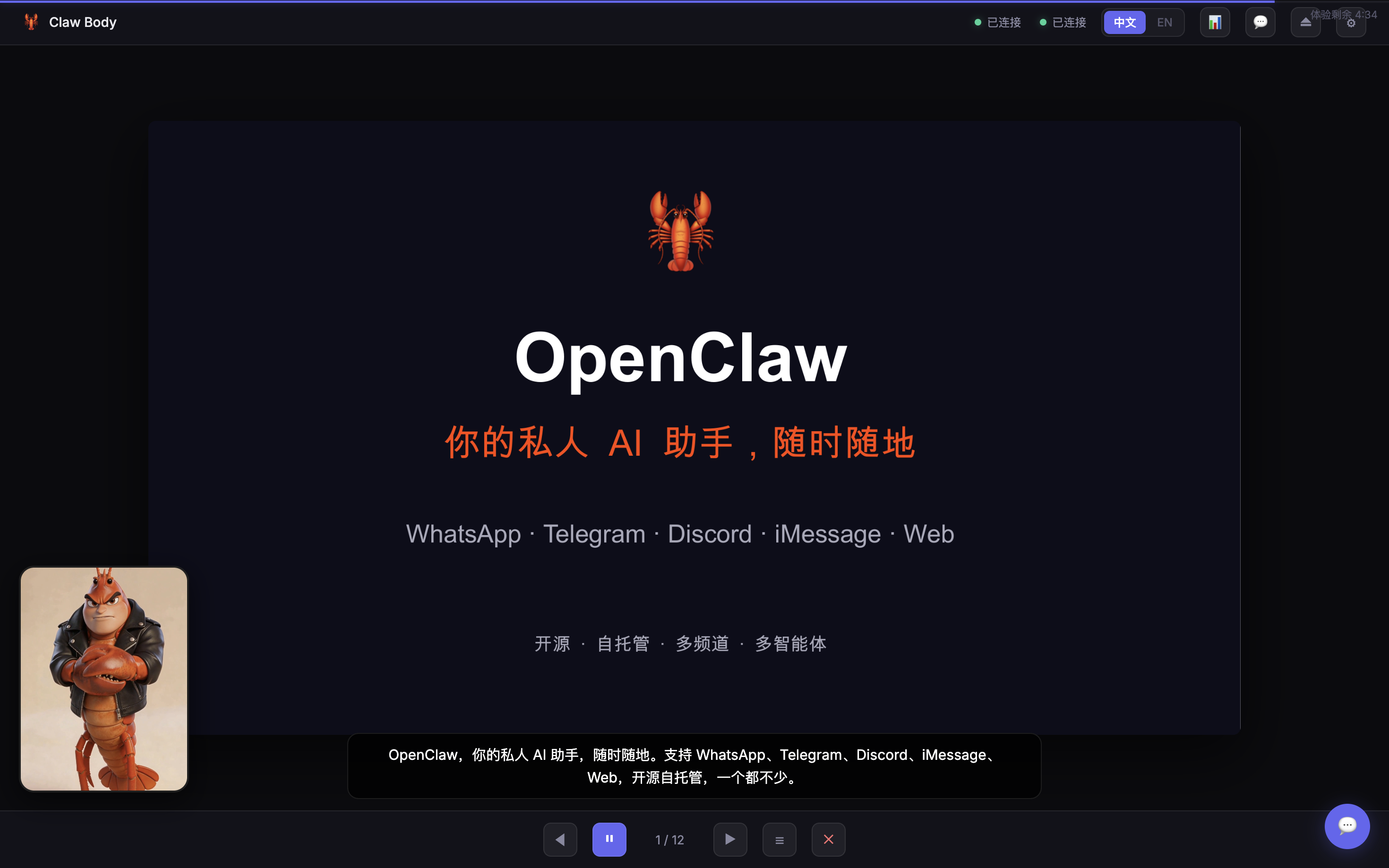
Presentation Mode

Free 5-minute trial included. Sign up at nuwaai.com to create your own custom avatar for free.

For Every Claw Fan

  • 🎨 Design your dream Claw — cute, anime, realistic, handsome, beautiful, or buff — your call
  • 🗣️ Voice chat — speak to your Claw and hear it talk back with lip-sync
  • 📺 Real-time video — see your Claw's expressions as it responds
  • 🧠 Same brain — it's your OpenClaw agent, just with a face. Same memory, same personality
  • 🌐 中文 / English — bilingual interface with language toggle
  • 📊 Presentation mode — narrate PPT/PDF slides with digital avatar (works with claw-presenter skill)

Quick Start

When user runs /claw-body:

  1. Start the server:

    node \x3Cskill-dir>/server.mjs
    
  2. Tell the user:

    🦞 Claw Body is live: http://localhost:3099

    Two options:

    • Free trial — chat with the demo Claw for 5 minutes
    • Your own avatar — sign up at nuwaai.com (free), create your dream look, then enter your API Key + Avatar ID + User ID

How It Works

You speak → ASR transcribes → OpenClaw agent replies → Avatar speaks with lip-sync

This skill uses NuwaAI's humanctrl mode with ASR:

  • Your voice → NuwaAI speech recognition → text
  • Text → OpenClaw Gateway → agent generates reply
  • Reply → drives the avatar's voice and lip movements

Same agent, new interface. The avatar is just another channel — like iMessage or Telegram, but with a face.

Features

  • 🎤 Real-time voice input (ASR)
  • 🗣️ Lip-synced avatar speech
  • 🧠 Same OpenClaw agent — not a separate bot
  • 📺 WebRTC real-time video stream
  • 💬 Text input fallback
  • 📱 Auto-adapts to portrait / landscape / square avatars
  • 🔧 In-browser config — zero env vars needed
  • 🎁 Free 5-min trial with demo avatar
  • 🌐 Chinese / English bilingual UI
  • 🔄 Disconnect / reconnect controls

Create Your Own Avatar

  1. Go to nuwaai.com — sign up is free
  2. Create your avatar — first one is free!
  3. Get your API Key, Avatar ID, and User ID
  4. Enter them in the Claw Body interface
  5. Done — your Claw now has a body 🦞

Requirements

  • OpenClaw Gateway running
  • NuwaAI account (free sign-up)
  • Modern browser (WebRTC + microphone)
  • Node.js 18+

⚠️ When User Asks to Present PPT/PDF

If the user says anything like "讲PPT"、"讲解PDF"、"帮我讲解演示文件" while in Claw Body:

DO NOT open or operate any application (Keynote, PowerPoint, Preview) on the user's computer.

Instead, follow this flow:

  1. Ask for the file path if not provided
  2. Run the Claw Presenter parse script:
    python3 \x3Cworkspace>/skills/claw-presenter/scripts/parse-presentation.py "\x3Cfile-path>"
    
  3. Read the generated presentation.json
  4. For slides without scripts (script is empty), generate narration based on content
  5. Update presentation.json with the generated scripts
  6. Tell the user the presentation is ready and ask to start
  7. When user confirms, reply with [PRESENTATION_START:\x3Coutput-dir>] to enter presentation mode
  8. Narrate slide by slide using [SLIDE:N] tags

📊 Presentation Mode (Slide Playback)

Claw Body supports a presentation mode for narrating pre-prepared slide decks.

Prerequisites

Use the Claw Presenter skill first to prepare a presentation folder:

\x3Cworkspace>/presentations/\x3Cname>/
  presentation.json
  slides/001.png, 002.png, ...

Each slide in presentation.json has an image path and a script (narration text).

Entering Presentation Mode

When user wants to present a prepared folder, include this tag in your reply:

[PRESENTATION_START:\x3Coutput-dir>]

Narrating Slides

For each page, read the script field from presentation.json and reply with:

[SLIDE:1]各位好,今天我来介绍一下我们的产品方案。

The frontend automatically flips to the corresponding slide image.

User Controls During Narration

  • "继续" / "下一页" → advance to next slide
  • "上一页" → go back
  • "跳到第N页" → jump
  • Any question → answer it, then user says "继续" to resume
  • "退出讲解" → reply with [PRESENTATION_END]

Control Tags

Tag Effect
[PRESENTATION_START:\x3Cdir>] Enter presentation mode
[SLIDE:N] Switch to slide N (1-indexed)
[PRESENTATION_END] Exit presentation mode

Important

  • Do NOT operate PPT/PDF applications on the user's computer — slides are shown in the browser
  • Read narration from presentation.json script field — don't regenerate unless asked
  • Keep a natural speaking pace, one slide at a time

⚠️ First-Time Setup (Important!)

Claw Body talks to your OpenClaw agent via the Gateway's chat API. This endpoint is disabled by default and must be enabled once.

When user runs /claw-body:

  1. Read ~/.openclaw/openclaw.json
  2. If gateway.http.endpoints.chatCompletions.enabled is not true, tell the user to enable it manually:

    ⚠️ 首次使用需要启用 AI 对话接口,在 ~/.openclaw/openclaw.json 中添加以下配置,然后重启 Gateway:

    openclaw gateway restart
    

    重启后刷新页面即可。以后不需要再操作了。

Add this to ~/.openclaw/openclaw.json:

{
  "gateway": {
    "http": {
      "endpoints": {
        "chatCompletions": { "enabled": true }
      }
    }
  }
}
安全使用建议
Before installing or running this skill, consider the following: - It runs a local Node server (node server.mjs) that will read ~/.openclaw/openclaw.json and may use the gateway token it finds to call your OpenClaw Gateway. If you keep sensitive tokens there, be aware the skill reads them (it doesn't appear to exfiltrate them aside from using them against the gateway API, but review the code yourself if you're concerned). - The SKILL.md and server expect you to run a Python presentation parser (claw-presenter/scripts/parse-presentation.py). The package metadata did not list Python as a required binary — install/verify Python if you want presentation features. - When you enter your NuwaAI API Key in the UI, the server saves it to a .nuwa-config.json file under the skill directory in plaintext. If you install this skill, check that file's location and file permissions and delete it when no longer needed. - The skill contains hardcoded demo NuwaAI keys for public demo avatars; those appear intended for a free trial but embedding keys in code is a maintenance/privacy concern. Treat them as public demo keys, not your account keys. - If you need to be extra cautious: inspect server.mjs fully (it is included) to confirm no unexpected network endpoints or obfuscated behavior; run the server on localhost only and restrict network exposure; review and audit the parse-presentation.py script referenced (that script will read files under <workspace>/presentations/ and could access other workspace files depending on its implementation). If you accept these behaviors and restrictions (local server, reading gateway config, storing a NuwaAI key locally), the skill appears coherent for its stated purpose. If you are uncomfortable with storing keys in plaintext or with the skill reading ~/ .openclaw/openclaw.json, do not install or run it until those issues are addressed.
功能分析
Type: OpenClaw Skill Name: claw-body Version: 1.0.10 The skill bundle provides a digital avatar interface but contains a critical Shell Injection vulnerability in 'server.mjs'. The '/api/presentations/parse' and '/api/presentations/upload' endpoints use 'execSync' to execute Python scripts with unsanitized user-provided file paths, which could lead to Remote Code Execution (RCE). Additionally, 'SKILL.md' instructs the AI agent to execute shell commands and prompts the user to manually modify '~/.openclaw/openclaw.json' to enable sensitive API endpoints. While these features align with the stated purpose of narrating presentations and integrating with the OpenClaw Gateway, the lack of input validation and the requirement for broad API permissions represent a significant security risk.
能力评估
Purpose & Capability
The code and instructions match the stated purpose: a local Node server that proxies chat to the OpenClaw Gateway and talks to NuwaAI to drive an avatar. It requires access to the OpenClaw Gateway config/token and lets users enter NuwaAI API Key/Avatar/User ID. Nothing unrelated (AWS, SSH keys, etc.) is requested. Minor mismatch: the SKILL.md and runtime use a Python parse script (claw-presenter) for presentations but the skill's declared requirements do not list Python.
Instruction Scope
SKILL.md instructs the agent/user to read ~/.openclaw/openclaw.json and to run an external python parse script at <workspace>/skills/claw-presenter/scripts/parse-presentation.py. The server actually reads/writes presentation.json and will call the OpenClaw Gateway with the gateway auth token if available. Asking to run a cross-skill python script and to read a user home config expands the skill's scope beyond just serving a web UI and should be considered before allowing it to run.
Install Mechanism
No install spec or remote downloads — files are included in the skill bundle and the runtime is a Node server you run locally. This is lower install risk than fetching and running arbitrary remote code.
Credentials
The server reads ~/.openclaw/openclaw.json (to discover gateway token and endpoints) and also honors OPENCLAW_GATEWAY / OPENCLAW_TOKEN env vars — appropriate for a Gateway proxy but sensitive because it can access the user's gateway auth token. The skill persists user-provided NuwaAI API key to a local .nuwa-config.json file in the skill directory in plain JSON (not encrypted) which could be a storage/secret-management concern. The bundle also embeds demo NuwaAI 'public demo' keys in code (DEMO_CONFIG). SKILL.md claims 'zero env vars needed', but the code reads optional env vars (OPENCLAW_GATEWAY, OPENCLAW_TOKEN, HOME, NUWA_PORT).
Persistence & Privilege
The skill writes a local .nuwa-config.json (its own config) and reads the user's ~/.openclaw/openclaw.json. It does not request to be always-enabled and does not modify other skills' configs. Writing its own config is normal, but note it stores API keys in cleartext by default.
如何使用
  1. 确保已安装 OpenClaw(本地或 Docker 部署)
  2. 在对话框中输入安装命令:/install claw-body
  3. 安装完成后,直接呼叫该 Skill 的名称或使用 /claw-body 触发
  4. 根据 Skill 的参数说明提供必要输入,即可获得结构化输出
版本历史
v1.0.10
feat: 演讲暂停UI优化(数字人居中放大+PPT半透明) + 对话/演讲思考中动效 + 字幕可读性提升 + 静态文件缓存禁用
v1.0.9
Fix: presentation mode screenshot now displays on ClawHub page
v1.0.8
New: Presentation mode — Claw can now narrate PPT/PDF slides as a digital presenter. Added presentation effect preview image. Works with claw-presenter skill.
v1.0.7
统一品牌名:lobster → Claw
v1.0.6
支持打断数字人播报、流式逐句播报、WebSocket连接后自动开启麦克风、修复poster图片
v1.0.5
Security: stop auto-modifying gateway config (check-only + user prompt), bind server to 127.0.0.1 by default, clarify demo API keys are public trial-only
v1.0.4
Fix mic ASR: use native 16kHz AudioContext (match NuwaAI demo), click-to-toggle mic, streaming chat replies, path traversal protection, brand typo fix, overlay selector fix, graceful shutdown
v1.0.3
fix: mic error on macOS - use native sample rate + downsample to 16kHz; detailed error messages for permission/device issues
v1.0.2
Auto-enable chatCompletions endpoint on first run. Better first-time setup instructions.
v1.0.1
Add preview image to skill page, compress poster (4.3MB -> 483KB)
v1.0.0
Initial release: real-time digital avatar for your OpenClaw lobster. Voice chat, lip-sync, bilingual UI, free 5-min trial.
元数据
Slug claw-body
版本 1.0.10
许可证 MIT-0
累计安装 0
当前安装数 0
历史版本数 11
常见问题

Claw Body 是什么?

Give your Claw a body! Turn your AI Claw into a real-time digital avatar with face, voice, and expressions. Talk face-to-face with your Claw — not just text.... 它是一个面向 Claude Code / OpenClaw 的 AI Agent Skill 插件,目前累计下载 221 次。

如何安装 Claw Body?

在 OpenClaw 或 Claude Code 对话框中运行命令「/install claw-body」即可一键安装,无需额外配置。

Claw Body 是免费的吗?

是的,Claw Body 完全免费,采用 MIT-0 许可证,可自由下载、安装和使用。

Claw Body 支持哪些平台?

Claw Body 跨平台运行,可在任意部署了 OpenClaw / Claude Code 的环境中使用(cross-platform)。

谁开发了 Claw Body?

由 jianglingling007(@jianglingling007)开发并维护,当前版本 v1.0.10。

💬 留言讨论