← 返回 Skills 市场

254
总下载
0
收藏
1
当前安装
1
版本数
在 OpenClaw 中安装
/install bizyair-upload
功能描述
BizyAir 文件上传助手。当用户需要将本地图片、音频、视频等资源上传到 BizyAir 服务器时使用此技能。支持快速上传并获取可访问的 URL。触发场景:用户提到"上传到 BizyAir"、"BizyAir 上传"、"上传图片到 BizyAir",或者需要获取 BizyAir input resource U...
使用说明 (SKILL.md)
BizyAir 文件上传助手
本技能帮助你将本地文件(图片、音频、视频等)上传到 BizyAir 服务器,并获取可访问的 URL。
功能
- 📤 上传本地文件到 BizyAir 服务器
- 🔗 获取可访问的资源 URL
- 📋 查询已上传的输入资源列表
前置准备
- 获取 API Key:访问 BizyAir 控制台 获取 API Key
- 配置环境变量(推荐):
export BIZYAIR_API_KEY="your_api_key_here"
使用方法
上传单个文件
当用户需要上传文件时:
请帮我把 /path/to/image.png 上传到 BizyAir
或者:
上传这张图片到 BizyAir 并获取 URL
批量上传
上传这些文件到 BizyAir:
- image1.png
- image2.jpg
- video.mp4
查询已上传资源
查看 BizyAir 中的输入资源列表
上传流程
技能会自动完成以下步骤:
- 获取上传凭证 - 从 BizyAir API 获取临时 STS 凭证和 OSS 上传参数
- 上传到 OSS - 使用阿里云 OSS SDK 将文件上传到指定存储
- 提交资源 - 在 BizyAir 系统中注册该资源
- 返回 URL - 返回可访问的资源 URL
输出示例
上传成功后会返回:
✅ 上传成功!
文件名: example.png
URL: https://storage.bizyair.cn/inputs/20250911/xxx.png
Object Key: inputs/20250911/xxx.png
错误处理
- API Key 未配置:提示用户设置
BIZYAIR_API_KEY环境变量或在对话中提供 - 文件不存在:检查文件路径是否正确
- 上传失败:显示详细错误信息,可能是网络问题或凭证过期
- 文件类型不支持:BizyAir 支持常见图片、音频、视频格式
注意事项
- STS 凭证是临时的,仅用于上传环节
- 上传后的 URL 可用于 BizyAir 工作流中的 LoadImage、LoadAudio、LoadVideo 等节点
- 建议上传后尽快使用或保存 URL
脚本使用
如需直接使用上传脚本:
python scripts/upload.py \x3Cfile_path> [--api-key \x3Ckey>]
使用效果
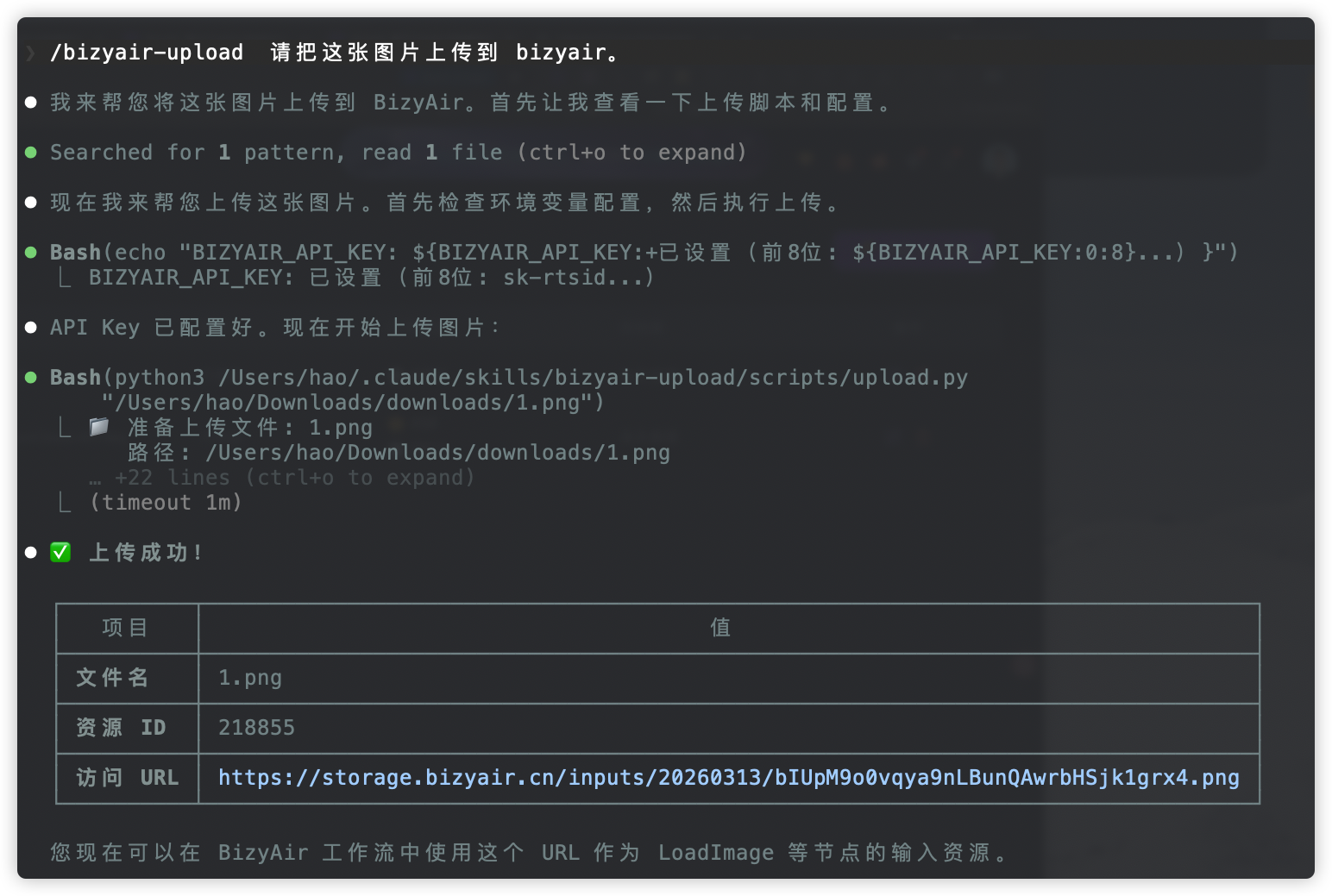
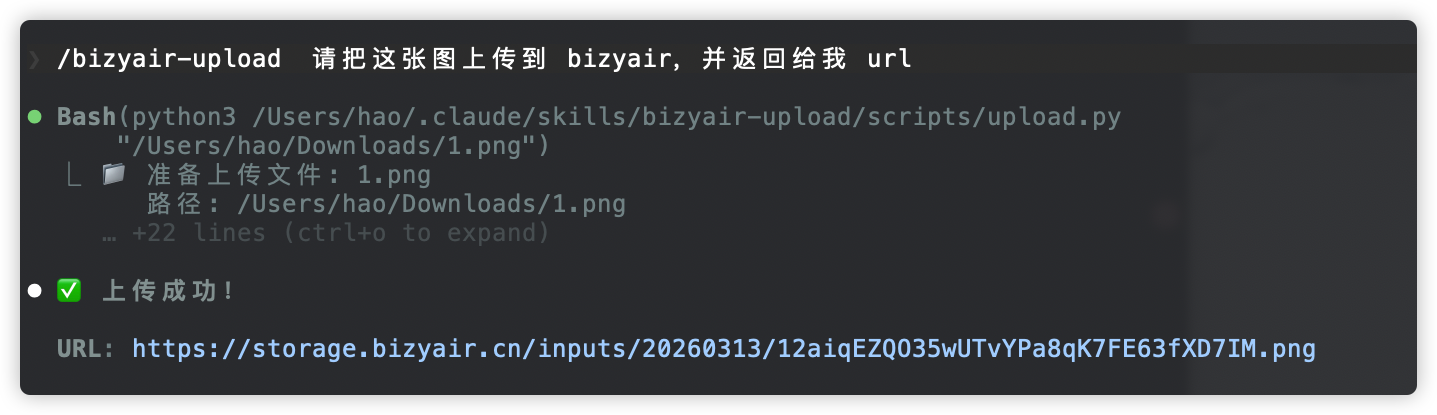
安全使用建议
This skill appears to do exactly what it claims: upload files you point it at to BizyAir. Before installing/using it: (1) Only provide your BIZYAIR_API_KEY via an environment variable or secure channel — avoid pasting secrets into open chat messages. (2) Verify you trust BizyAir and the api/storage domains (api.bizyair.cn, storage.bizyair.cn) because uploaded files are sent there. (3) When running the script, be careful to specify only the files you intend to upload (it will read local file paths you give it). (4) You will need to install standard Python dependencies (requests, alibabacloud-oss-v2). If you want higher assurance, inspect the upload token and commit endpoints or test with a non-sensitive file and a scoped API key first.
功能分析
Type: OpenClaw Skill
Name: bizyair-upload
Version: 1.0.0
The bizyair-upload skill is a utility designed to upload local media files to the BizyAir AIGC platform. The core logic in `scripts/upload.py` implements a standard three-step upload process (requesting STS credentials, uploading to Alibaba Cloud OSS, and committing the resource) using legitimate libraries like `requests` and `alibabacloud_oss_v2`. There is no evidence of unauthorized data exfiltration, hidden backdoors, or malicious prompt injection; the skill only accesses files explicitly requested by the user or agent for the stated purpose.
能力评估
Purpose & Capability
The name/description (uploading local files to BizyAir) matches the code and SKILL.md. The script talks to api.bizyair.cn to obtain STS/OSS upload parameters, uses Alibaba OSS SDK to upload the provided local file, and then registers the resource — all expected for this purpose.
Instruction Scope
SKILL.md and the script only instruct the agent/user to provide a file path and an API key (env var or argument). The runtime steps are limited to calling BizyAir APIs, uploading the specified local file to OSS using temporary STS credentials, and registering the resource. There are no instructions to read unrelated system files, secrets, or send data to third-party endpoints beyond BizyAir/storage endpoints.
Install Mechanism
This is instruction + script only (no install spec). Dependencies are standard Python packages (requests, alibabacloud-oss-v2) cited in README; no downloads from untrusted URLs or archive extraction. Reasonable for a Python upload tool.
Credentials
Only BIZYAIR_API_KEY is referenced as required (and optionally passed as a CLI arg). No unrelated credentials or config paths are requested. The script will request the API key from env or command line, which is appropriate and proportionate for the stated functionality.
Persistence & Privilege
Skill is not always-enabled, is user-invocable, and does not modify other skills or system-wide settings. It does not request elevated privileges or persistent system presence.
如何使用
- 确保已安装 OpenClaw(本地或 Docker 部署)
- 在对话框中输入安装命令:
/install bizyair-upload - 安装完成后,直接呼叫该 Skill 的名称或使用
/bizyair-upload触发 - 根据 Skill 的参数说明提供必要输入,即可获得结构化输出
版本历史
v1.0.0
bizyair-upload v1.0.0
- Initial release of BizyAir 文件上传助手.
- Upload local images, audio, video, and other files to BizyAir server.
- Quickly receive accessible URLs after upload.
- List already uploaded BizyAir input resources.
- Includes API key setup instructions and error handling guidance.
元数据
常见问题
BizyAir 文件上传 是什么?
BizyAir 文件上传助手。当用户需要将本地图片、音频、视频等资源上传到 BizyAir 服务器时使用此技能。支持快速上传并获取可访问的 URL。触发场景:用户提到"上传到 BizyAir"、"BizyAir 上传"、"上传图片到 BizyAir",或者需要获取 BizyAir input resource U... 它是一个面向 Claude Code / OpenClaw 的 AI Agent Skill 插件,目前累计下载 254 次。
如何安装 BizyAir 文件上传?
在 OpenClaw 或 Claude Code 对话框中运行命令「/install bizyair-upload」即可一键安装,无需额外配置。
BizyAir 文件上传 是免费的吗?
是的,BizyAir 文件上传 完全免费,采用 MIT-0 许可证,可自由下载、安装和使用。
BizyAir 文件上传 支持哪些平台?
BizyAir 文件上传 跨平台运行,可在任意部署了 OpenClaw / Claude Code 的环境中使用(cross-platform)。
谁开发了 BizyAir 文件上传?
由 bozoyan(@bozoyan)开发并维护,当前版本 v1.0.0。
推荐 Skills