← Back to Skills Marketplace
maweis1981

Comic To Realistic

by Patronum · GitHub ↗ · v1.0.3 · MIT-0
cross-platform ⚠ suspicious
145
Downloads
0
Stars
0
Active Installs
4
Versions
Install in OpenClaw
/install comic-to-realistic
Description
Convert comic or anime character images into high-quality, realistic portraits while preserving key facial features and expressions.
README (SKILL.md)

Skills.md

Skill Name

comic-to-realistic


Description

Convert comic, anime, or illustration-style character images into high-quality, realistic human portraits.

This skill leverages AI-powered prompt enhancement and image-to-image generation to transform 2D artistic styles into photorealistic human visuals, while preserving key identity features such as hairstyle, facial structure, and expression.


Service Overview

⚠️ Note:

  • ai.ngmob.com is used for product access, workflow management, and console operations
  • api.ngmob.com is used strictly for API requests and workflow execution

Use Cases

  • Anime / comic character → realistic human conversion
  • AI-generated avatars and profile images
  • Game character realism enhancement
  • Visual content creation for marketing and social media

Inputs

Name Type Required Description
Image Input string (URL) Publicly accessible image URL (anime/comic style)

Prompt Guidelines

To achieve the best results, include the following in your prompt:

Style Keywords

  • realistic / photorealistic / ultra realistic
  • cinematic

Photography Settings

  • 85mm lens
  • shallow depth of field
  • studio lighting / soft lighting

Detail Enhancements

  • detailed skin texture
  • natural skin tone
  • high detail face

Preview

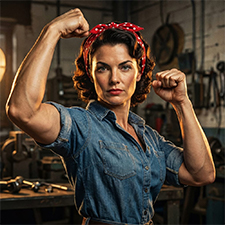
Comic Realistic

Example (Recommended)

{
  "Image Input": "https://example.com/anime.jpg"
}
Usage Guidance
This skill appears to do what it says (use an external API to convert anime/comic images to realistic portraits) but has an important inconsistency: the manifest expects a Bearer API_KEY while the skill metadata and SKILL.md do not declare any required credentials or tell you where to obtain one. Before installing or using the skill: 1) Ask the publisher for a homepage, privacy policy, and where the API_KEY should come from; verify the ai.ngmob.com endpoint is trustworthy. 2) Understand that submitting image URLs (especially photos of real people) sends data to a third-party service—check retention, sharing, and consent. 3) Only supply an API key created for this service and with minimal permissions; do not reuse high-privilege or long-lived credentials (e.g., cloud provider keys). 4) If you are uncomfortable with an unknown provider, decline installation or request the author to declare required env vars explicitly (API_KEY) and provide a source/terms of service. Additional evidence (author contact, homepage, or documentation) would raise confidence toward benign; absence keeps this suspicious.
Capability Analysis
Package: comic-to-realistic (xpi) Version: 1.0.0 Description: Convert comic or anime images into realistic human portraits using AI The provided files constitute a configuration for an AI-based image transformation service. The manifest.json defines standard API interactions (POST requests and GET polling) with a specific backend (api.ngmob.com) to process images. There is no executable code, shell script, or logic that attempts to access sensitive local files, environment variables, or perform unauthorized data exfiltration.
Capability Assessment
Purpose & Capability
The skill's name, README, SKILL.md, and manifest all describe an image-to-image workflow against https://api.ngmob.com, which is coherent with a comic→realistic transformation service. However the author/source are unknown and there is no homepage; the manifest points to a third-party API (ai.ngmob.com/api/v1/workflows/...) rather than a well-known vendor, which reduces transparency.
Instruction Scope
SKILL.md instructs the agent to accept a publicly accessible image URL and a prompt, and to call the external API for image-to-image generation. The instructions do not attempt to read local files, shell history, or unrelated environment data. They do reference product and API base URLs and include prompt guidance; scope remains limited to the stated task.
Install Mechanism
There is no install spec and no code files executed by the platform — this is instruction-only. That minimizes install-time risk (nothing is downloaded or written by an installer).
Credentials
The manifest includes an Authorization header using 'Bearer {{API_KEY}}' and a polling flow that also uses {{API_KEY}}, but the registry metadata and SKILL.md declare no required environment variables or primary credential. This mismatch is an incoherence: calling the remote API legitimately requires an API key, but the skill does not declare that requirement or explain how the key is provided. That gap could lead to unexpected prompts for credentials or silent failures. Also the manifest posts image URLs to a third-party service — users should consider privacy of images uploaded.
Persistence & Privilege
The skill is not always-on and does not request elevated platform privileges. It does not attempt to modify other skills or system configuration. Autonomous invocation is permitted (default) but this is normal and not by itself concerning.
How to Use
  1. Make sure OpenClaw is installed (local or Docker)
  2. Run the install command in chat: /install comic-to-realistic
  3. After installation, invoke the skill by name or use /comic-to-realistic
  4. Provide required inputs per the skill's parameter spec and get structured output
Version History
v1.0.3
- Updated preview section with new example images showcasing both comic and realistic styles. - No changes made to features, functionality, or inputs.
v1.0.2
- Updated input configuration: simplified to a single "Image Input" field (URL); removed separate prompt requirement. - Added a Preview section with a sample image to help users visualize the output. - Updated example usage to match the new input format. - Clarified input table and removed "prompt" parameter.
v1.0.1
- Added service overview section, including product website and clear API base URL distinctions. - Improved and clarified use cases and input descriptions. - Reformatted and streamlined prompt guidelines for clarity. - Updated overall structure for better readability and consistency. - Removed Chinese content; all documentation is now provided in English.
v1.0.0
comic-to-realistic v1.0.0 - Initial release: Convert comic/anime/illustration images into high-quality realistic portraits. - Supports prompt optimization and automatic enhancement for photorealistic output. - Designed for creative use cases including character visualization, social media, and content design. - Best results with high-res, clear, single-character images; supports async processing via API. - Detailed documentation on optimal prompt structure and workflow integration included.
Metadata
Slug comic-to-realistic
Version 1.0.3
License MIT-0
All-time Installs 0
Active Installs 0
Total Versions 4
Frequently Asked Questions

What is Comic To Realistic?

Convert comic or anime character images into high-quality, realistic portraits while preserving key facial features and expressions. It is an AI Agent Skill for Claude Code / OpenClaw, with 145 downloads so far.

How do I install Comic To Realistic?

Run "/install comic-to-realistic" in the OpenClaw or Claude Code chat to install it in one step — no extra setup required.

Is Comic To Realistic free?

Yes, Comic To Realistic is completely free, licensed under MIT-0. You can download, install and use it at no cost.

Which platforms does Comic To Realistic support?

Comic To Realistic is cross-platform and runs anywhere OpenClaw / Claude Code is available (cross-platform).

Who created Comic To Realistic?

It is built and maintained by Patronum (@maweis1981); the current version is v1.0.3.

💬 Comments